Take the deposit. Let the balance collect itself.
Guests can pay a deposit today and authorise the rest to be taken automatically when it falls due, or spread the stay across weekly, fortnightly or monthly instalments. Chasing balances by email in February stops being part of the job.
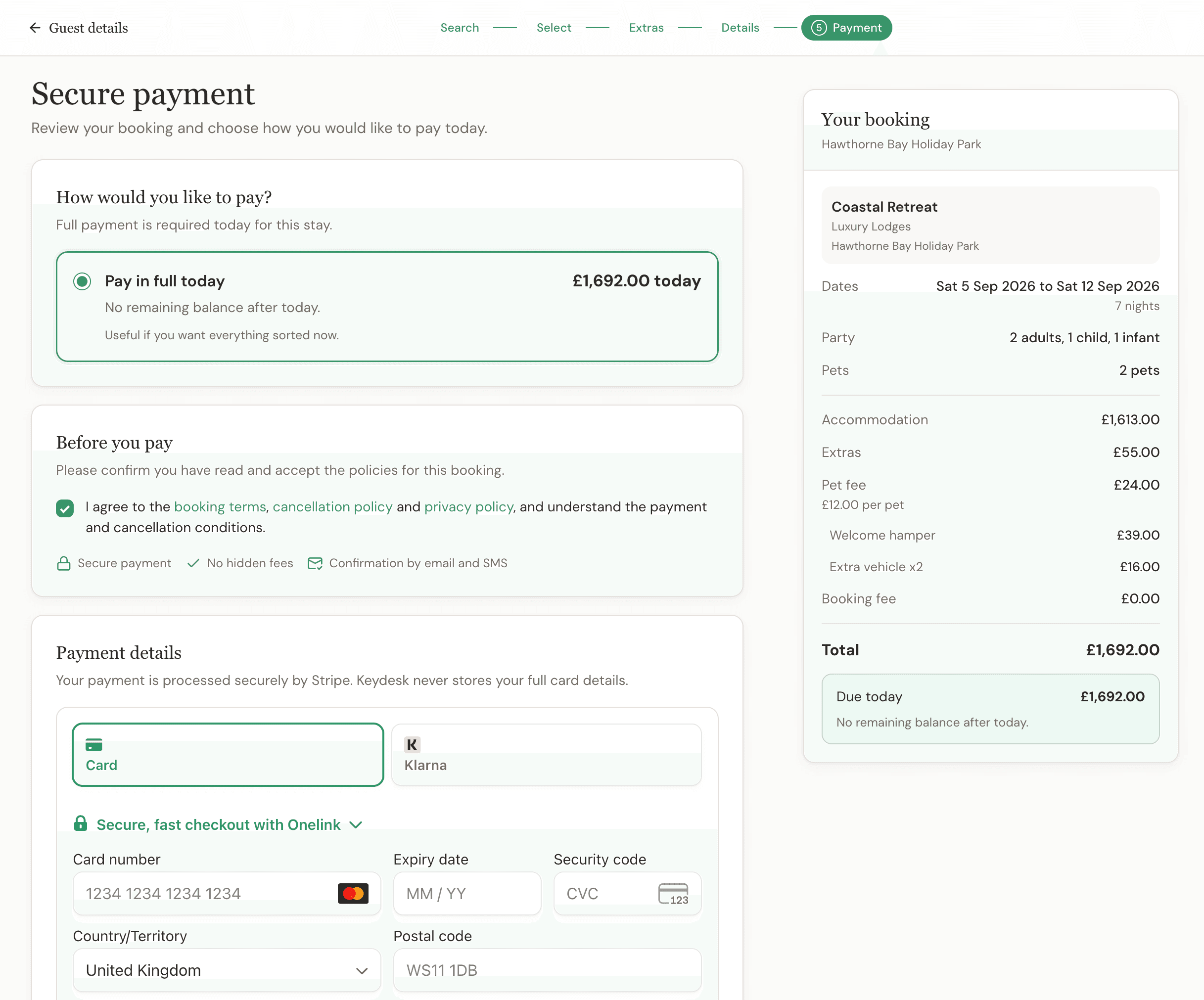
A payment flow the guest and booking office can follow.
The payment rule starts with the booking, passes through a familiar card checkout and returns as a recorded payment with any balance still due.
- Step 01Set what is due
- Use the deposit or payment-in-full policy configured for the booking.
- Step 02Guest pays by card
- The online booking journey passes the card payment through Stripe.
- Step 03Payment is recorded
- The reservation keeps the successful payment and its history in context.
- Step 04The balance collects itself
- Where the guest authorised it, Keydesk takes the balance on the due date and updates the booking. Where they did not, it stays on the outstanding-balances view.
Know what was paid and what is still due.
A deposit only helps operations when it remains connected to the reservation. Keydesk keeps the payment position visible as the stay approaches.
- The right amount up front
- Take the deposit you set to secure the reservation, or require the full booking value when that is the better policy.
- One payment history
- Payments and refunds are recorded against the original transaction, and commission, gross value, net value and what the guest actually paid are shown separately rather than rolled into one number.
- Due dates the team can see
- The bookings workspace has a view for outstanding balances, so what is owed is a list you work through rather than something you go looking for.
- Connected to direct booking
- A website reservation, its payment and its direct channel source arrive together in Keydesk.
- Payment requests the guest can pay
- Email or text a secure payment request so the guest settles a deposit or balance on their own device, without card details being read out over the phone.
- A deadline that resolves itself
- Set a deadline on a payment request and let the booking cancel automatically if it passes unpaid, so held dates go back on sale without anyone chasing.
The balance chase is the worst job in the business. So we took it off you.
A guest books in November for August. Six weeks before they arrive, someone has to notice the balance is due, email them, wait, email again, and eventually ring. Do that across a full season and it is days of work to collect money the guest always intended to pay. Keydesk asks the guest once, at the moment they are most willing to say yes, and then simply takes it.
- The guest agrees up front
- At checkout the guest is shown the exact amount and the exact date it will be taken, and agrees to that separately from the booking terms. Nothing is taken from a card that was not knowingly left on file.
- Or spread across instalments
- Offer weekly, fortnightly or monthly plans for the stays that warrant it. Amounts are worked out to the penny and land before your cancellation deadline, not after it.
- Your rules, not ours
- Set the minimum booking value, the minimum instalment amount and which schedules guests are allowed to choose. A £90 weekend does not need a payment plan.
- Nobody is surprised
- Guests get a notice before each collection, so the payment that appears on their statement is one they were expecting.
- Guests can manage it themselves
- A secure area lets them check the schedule, swap a card, pay early or stop future automatic payments, which is most of what they would otherwise phone you about.
- Failures handled properly
- A declined payment follows controlled retry rules. A card that needs the guest to authorise it asks them, not you. You can pause a plan, resume it or send a recovery link.
Four ways to finish a booking, not one.
Not every phone booking ends with a card payment. A regular who always settles on arrival, a group still confirming numbers and a first-time guest booking a bank holiday are three different situations, and forcing them down the same path is how bookings end up recorded wrongly.
- Take payment now
- Collect the deposit or full amount straight away while the guest is on the phone.
- Send a payment request
- Email or text a secure link and let the guest pay in their own time, with an optional deadline.
- Confirm without payment
- Confirm the reservation now and record what is owed, for the guests you already know.
- Save as provisional
- Hold the booking while something is still being decided, without treating it as confirmed.
Buy what is available, not a vague promise.
Payment workflows differ substantially between booking systems. Keydesk separates the current live capability from requirements that still need a specific conversation.
- Deposit or payment in full
- Automatic balance collection
- Weekly, fortnightly and monthly instalments
- Guest-managed payment schedules
- Payment links by email or text
- Auto-cancel on an unpaid deadline
- Refunds against the original payment
- Payment history, balances and due dates
- Chargeback handling
- Accounting reconciliation
- Alternative payment gateways
- Direct debit and open banking
- Deposit release and damage holds
One payment position, whatever guests are booking.
Explore how deposits and balances sit inside the wider reservation workflow for each kind of site.
Campsites
Pitch bookings with flexible pricing and deposits.
See the solutionCaravan parks
Touring and hire bookings in one operational view.
See the solutionHoliday parks
Grade and stay-package bookings with clear balances.
See the solutionGlamping sites
Distinctive stays, extras and secure online payment.
See the solutionDeposits and payments FAQ
Can I send a guest a link to pay?
Yes. Keydesk can email or text a secure payment request, and the guest pays on their own device. It is useful for balances, for phone bookings where you would rather not take card details verbally, and for anyone who wants to pay later that day.
What happens if a payment request is not paid?
You can set a deadline on the request and have Keydesk cancel the booking automatically if it passes unpaid. The dates go back on sale without anyone having to remember to chase, which matters most on the busy weekends where a held-but-unpaid booking is expensive.
Does every booking have to be paid for straight away?
No. A booking-office reservation can be completed in four ways: take payment now, send a payment request, confirm without payment and record what is owed, or save it as provisional while something is still being decided.
Can guests pay a booking deposit online?
Yes. You set the payment required at booking, and guests can pay that deposit by card through Stripe during the Keydesk Direct booking journey. Keydesk records the payment against the reservation and shows the remaining balance.
Can I ask for full payment instead of a deposit?
Yes. Keydesk supports a payment-in-full option as well as taking a deposit with a balance due later, so the rule can reflect the booking policy you have configured.
How does Keydesk track an outstanding balance?
The booking record keeps the payment history, amount paid, amount still due and the applicable due date together. That gives the booking office a clear view without maintaining a separate payment spreadsheet.
Who processes the card payment?
Card payments are processed through Stripe, the payment provider Keydesk currently uses. Stripe payment-processing fees are separate from Keydesk software pricing.
Does Keydesk send balance reminders?
Yes. Keydesk schedules reminders before the balance due date, and sends an upcoming-payment notice before any automatic collection. The due amount and date remain visible on the booking so the team can see what is outstanding. All guest messaging sits behind an account-level switch, so a test or demonstration account never emails a real guest.
Does Keydesk automatically charge the remaining balance?
Yes, where the guest has agreed to it. At checkout you can offer “deposit today, balance collected automatically”. The guest sees the exact amount and date, consents to that future payment separately from the booking terms, and their card is stored securely with Stripe for that purpose. On the due date Keydesk takes the payment and updates the booking and financial records. Guests who did not authorise it are handled the old way: the balance stays visible and outstanding until it is paid.
Can guests pay for a stay in instalments?
Yes. Weekly, fortnightly and monthly plans are supported, with amounts calculated to exact pennies and scheduled so the stay is paid for by your contractual deadline. You control which schedules are offered, the minimum booking value that qualifies and the minimum instalment amount, so a two-night midweek break does not turn into a payment plan.
What happens if an automatic payment fails?
Keydesk follows controlled retry rules rather than hammering the card. If the payment needs the guest to authenticate, or the card is declined outright, the guest is asked to act and given a secure link to fix it. You can review every attempt, pause or resume a plan, and send a recovery link. Protections are in place to make sure a balance or instalment cannot be taken twice.
Can a guest change their card or cancel automatic payments?
Yes, and they can do it without phoning you. Every guest on an automatic plan gets a secure Manage Payments area where they can see the schedule, replace their card, pay early or stop future automatic collection. Anything they change is visible to you on the booking.
Can I use a payment provider other than Stripe?
Stripe is the payment provider Keydesk currently describes and supports for online card payments. No alternative payment gateway is claimed on this page.
What do deposits and online payments cost?
Keydesk is £49 per month, per site, with no Keydesk booking commission, and automatic balance collection and instalments are included rather than charged as an upgrade. Stripe processing fees remain separate, and a deposit, a balance and each instalment are separate payment transactions, so a payment plan means more processing fees than a single payment. Review the current provider fees for your card mix and business.
Comparing total costs? Payment processing can sit outside the software subscription.
Read the booking-system cost guideMake every booking’s payment position obvious.
Create your account and start bringing deposits, balances and due dates into one clear booking workflow.
Create your account today. £49/month per site, billed monthly, with no long-term contract.