A timeline, not a page
Scroll forwards and backwards through the season without waiting for a page of dates to load. Jump straight to a date, or step a week at a time, and today stays anchored so you never lose your place.
Move through your season by scrolling, not by loading one page of dates at a time. Drag across empty dates to start a booking with the unit and stay already filled in, block a pitch without leaving the screen, and watch channel bookings appear on the same timeline as your own.
Get started with Keydesk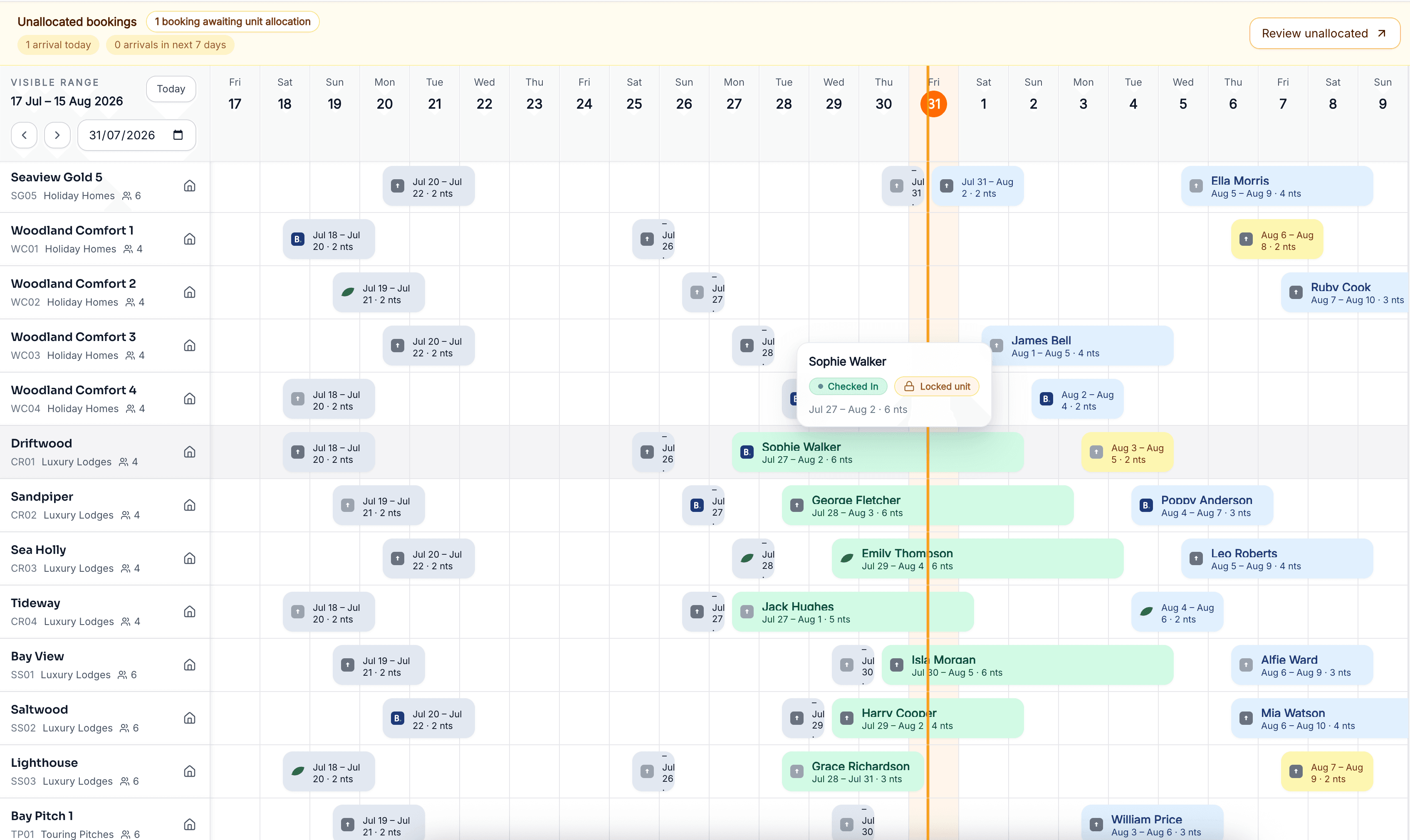
Scroll forwards and backwards through the season without waiting for a page of dates to load. Jump straight to a date, or step a week at a time, and today stays anchored so you never lose your place.
Only the part of the calendar you can actually see is drawn, so hundreds of pitches and units stay responsive rather than turning the calendar into something you avoid opening.
Drag across free dates to start a booking with the unit and stay preselected, create a manual block where something cannot be sold, and remove it from the same place when it can be again. Booking bars stay usable as the calendar scrolls sideways.
Accommodation businesses do not always sell inventory the way they allocate it. Keydesk can structure grades and individual units so the calendar reflects both the guest offer and the team’s operating reality.
Group suitable pitches or units by the capacity, facilities, pricing and stay rules a guest can choose.
Allocate the exact pitch or unit according to the operating approach agreed for your business.
Block a unit straight from the calendar for maintenance, an owner’s week or a flooded field, and remove the block when it is no longer needed. Those blocks also go out through your channel connections, so nothing gets sold underneath you.
When dates or accommodation change, review the stay, price, payments and remaining balance together. The calendar should start the workflow, not hide its consequences.
See deposits and balancesBooking calendar software gives an accommodation team a time-based view of availability and reservations. A useful operational calendar also shows which unit or pitch is involved, the reservation status, closures and the information needed to manage changes and upcoming stays.
Yes. Keydesk is being built for mixed accommodation businesses, so touring pitches, lodges, pods, caravans and other bookable inventory can sit in one calendar while retaining their own capacity, pricing and stay rules.
Yes. Keydesk Direct and reservations taken by your booking office use the availability held in Keydesk. Operating dates, confirmed reservations and closures affect what can be sold.
Keydesk supports grade-based accommodation structures. The allocation approach depends on how your business sells and operates its inventory, so confirm the required workflow during onboarding.
Reservations can be amended as operating plans change. The important part is to review dates, accommodation, price and balance together rather than treating a move as a colour change on a diary.
It removes most of the risk, which is an honest claim rather than a guarantee. Pitchup availability is published from the Keydesk calendar and Pitchup bookings return to it through a full API integration. Every other channel connects through two-way calendar sync, so a booking taken there imports as blocked dates and your own bookings, closures and manual blocks go out as unavailable dates. What nobody can promise is instant timing: channels refresh calendar feeds periodically, so two bookings landing on two channels within minutes of each other is still possible.
Create your account and start bringing pitches, units, reservations and arrival-day work into one clear view.
Create your account today. £49/month per site, billed monthly, with no long-term contract.
We use cookies to analyse site traffic and personalise content. You can accept all cookies or reject non-essential ones. Read our Cookie Policy for details.